 A Wolfbook family project
WLaTeX
The LaTeX engine of the future.
Your pages change as you type — no compile button, no waiting for a PDF. Click anywhere on the page to land on its exact source, type straight onto the page, and draw your TikZ pictures by hand.
Wolfbook and WPaper stay free, always. Buying WLaTeX is how you support the project.
Real time, not sped up: the page on the right is redrawn with every keystroke.
Every number comes from the test runs on real papers, not hand-picked.
Write on the paper, not at it
WLaTeX keeps a TeX engine running beside your document. When you type, it re-typesets only what changed and shows the new page straight away — then writes the finished PDF when you pause.
Every keystroke, on the page
No save-and-compile loop. WLaTeX resumes typesetting from the page you are editing, so the preview keeps up with your typing even in a long book.
- Pages redraw live; the settled PDF follows when you pause
- Pages and page maps checked equal to full builds
- BibTeX, biber, makeindex and glossaries run when their inputs change
Click a word, type on the page
Every glyph knows the character of source that made it. Click a word and the caret lands there; click in prose and just type — the edit goes into your .tex file.
- Character-exact, not line-level like SyncTeX
- Source → page highlighting follows your caret
- Escapes and whole-command Backspace handled for you
- In VS Code a key typed on the page comes back as a caret in 26–63 ms
Format what you see
Select text on the page and a small toolbar offers bold, emphasis, typewriter, math, footnote and more — written as LaTeX in the right place. Drag a selection to move its source.
- ⌘-click widens to the enclosing object, ⌘⇧-click narrows back
- Refuses edits that would split a group, instead of breaking your file
Pick a label, find a paper
⌘⇧R opens every label in the document with its printed number and a preview; ⌘⇧C does the same for your bibliography and searches INSPIRE-HEP for papers you haven't cited yet.
- Hover a
\refto see what it prints - Labels revealed directly on the page
Draw your pictures by hand
Turn on the picture editor and TikZ figures become objects: drag a node and the arrow follows, draw shapes, edges and Feynman diagrams, restyle from swatches — the TikZ code is rewritten for you.
- Snaps to a 1 mm grid with smart guides
- One undo step per gesture
See where you are writing
Move through the source and the page marks the word you are in with a soft wash that fades, and a thin red caret at the exact letter — so you always know where on the paper your cursor is.
- The wash fades after three seconds; the caret stays
- Click the page and the word you clicked lights up the same way
Select, then stretch it
Drag across the page and the source selects exactly those words. Red brackets mark the ends — drag one to grow or shrink the selection, across lines if you like.
- Selections follow the printed lines
- Drag a selection to move its source; ⌘-click widens to the enclosing object
Every label, at a glance
Hold Shift and the paper shows its cross-reference skeleton: each label beside its number, each reference and citation in the margin, the number it printed underlined. Hover one to see the equation it names; click to copy \eqref{…}.
- ⌥-click copies the bare label name
- Section and equation tags copy
file:lineto point an agent at them
Fold away what you are not working on
Fold a section and it leaves the page — shorter paper, faster builds — while the heading stays with a note of how many lines are hidden. The fold is two comment lines in your .tex, so colleagues and Overleaf still see the whole paper.
- Copy, cut or delete a whole section from the page
- Unfold all in one click
See what a reference points at
Hover \eqref in the source and the equation itself appears, cropped from the page, with its number and source. Hover a \cite and you get the bibliography entry.
- Shows every place the label is used
- ⌘-click or F12 jumps to the \label
Equations, tables and figures get their own cards
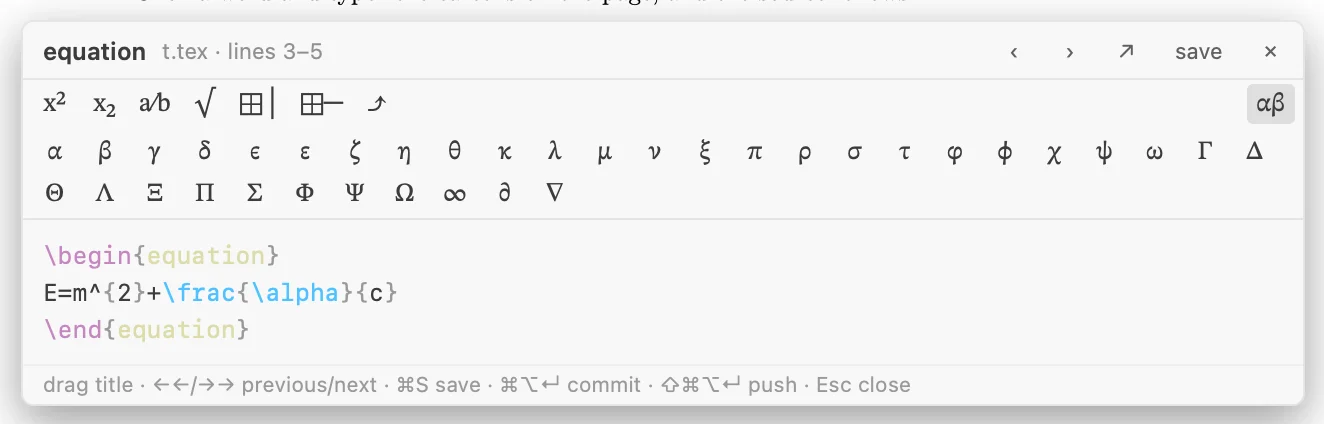
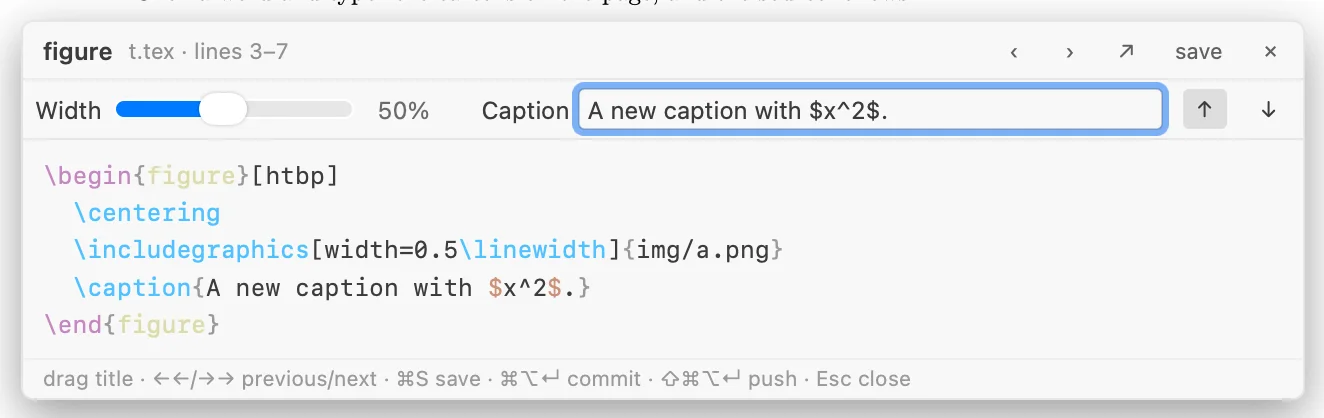
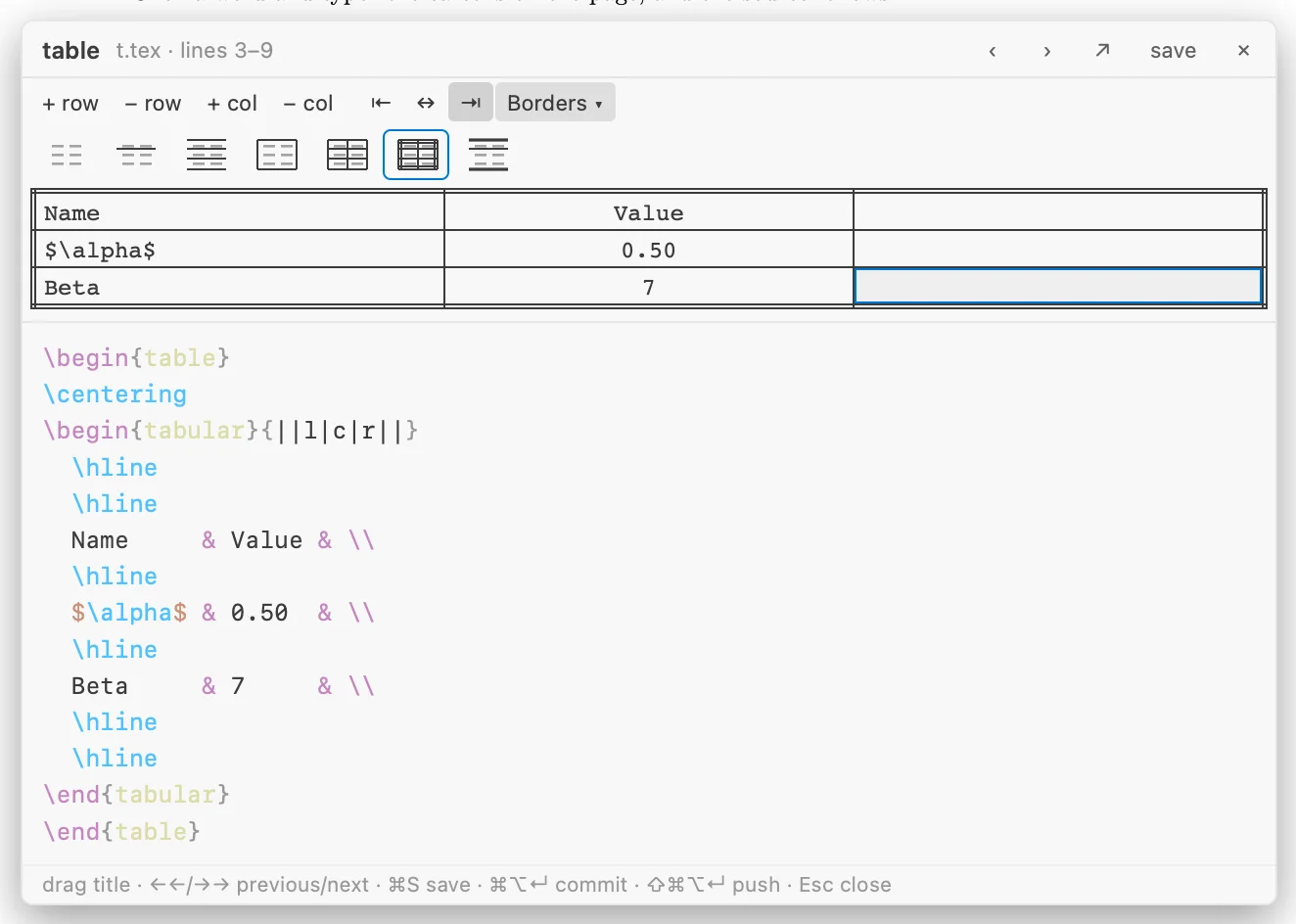
Click an equation, a table or a figure on the page and a small card opens on its source: a symbol palette, a table grid with rows, columns and borders, and a width slider and caption for figures.
Its own PDF writer
The finished PDF comes from WLaTeX's own writer: nearly three times faster than xdvipdfmx, and checked equal to it on 53 of 55 real arXiv papers.
Compare & merge
Compare with the file on disk or any Git revision, step through changes on the page, and three-way merge collaborators' edits.
Git & Overleaf
Commit with a message that names the sections and equations you changed; sync with an Overleaf project through its Git remote.
Errors where they happen
TeX errors are placed at their source line, and a live page keeps showing while you fix them. Reference and environment checks as you type.
Contents & structure
A numbered outline you can reorder by dragging, section folding, equation and figure markers on the page.
Ready for arXiv
One command makes the upload: comments and draft mode stripped, only the figures you use, the .bbl in place of the .bib, a 00README.json — and it is built once as arXiv will build it before you save.
Private by design
Typesetting runs on your own machine — no cloud compile. The licence is checked offline; no account, no server.
In VS Code with Wolfbook, or on its own
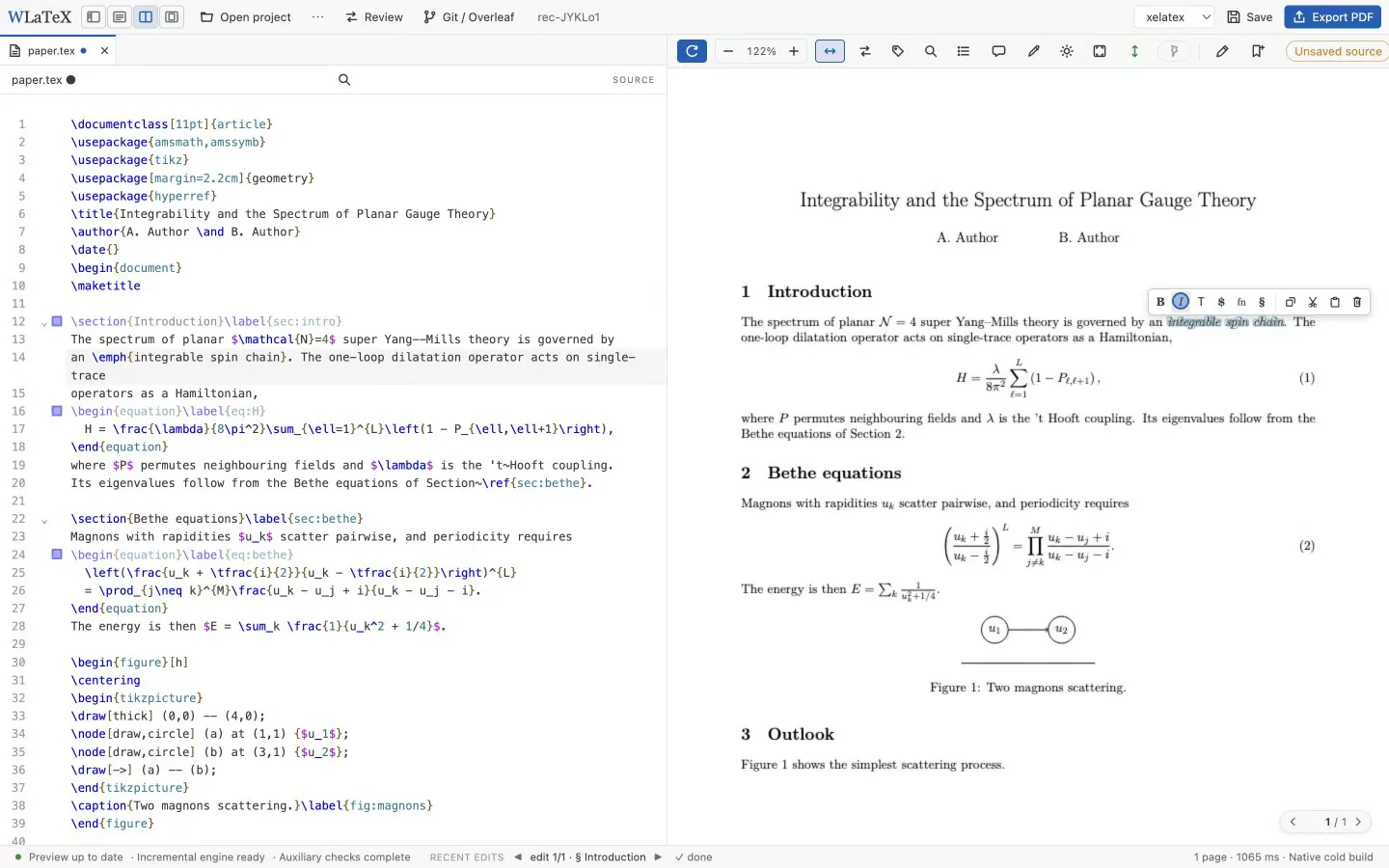
WLaTeX powers WPaper, Wolfbook's LaTeX workspace in VS Code. It also comes as a compact desktop editor with the same features and icons.
WPaper in VS Code on a real 70-page paper: typing, the reference and citation pickers, and the page following along.
Free where it matters. Supported where it counts.
Wolfbook and WPaper are free and always will be. WLaTeX is the one paid part of the family: it pays for the time that keeps all three moving.
Wolfbook
- Notebooks with a live Wolfram kernel
- Opens Mathematica
.nbfiles - AI agents, MCP, presentations
WPaper
- Compiled pages beside your source
- Click-to-source, review of AI edits
- Compare, Git and Overleaf sync
WLaTeX
- Pages that change as you type
- Character-exact click-to-source, typing on the page
- TikZ editor, selection toolbar, pickers
- Own fast PDF writer
- Works in WPaper and as a desktop app
After the trial, nothing is locked away from your documents: WPaper goes back to compiling with your own TeX installation, and your files are always plain .tex.
Get started
WLaTeX is in early access. The first public release is being prepared for macOS on Apple silicon; Windows and Linux follow.
With Wolfbook in VS Code
- Install Wolfbook from the VS Code Marketplace (free).
- Install a TeX distribution — MacTeX or TeX Live — for packages and fonts.
- Download WLaTeX SOON and unpack it anywhere.
- In VS Code settings set
wolfbook.tex.mapEnginetowlatexandwolfbook.tex.wlatexDirectoryto the WLaTeX folder. - Open a
.texfile and run Wolfbook: Open WPaper. Your 30-day trial starts; later, add your licence with WPaper: Enter WLaTeX Licence…
On its own: the WLaTeX desktop editor
Needs a TeX installation (MacTeX / TeX Live) · first release: macOS on Apple silicon
Will Wolfbook and WPaper stay free?
Yes. Wolfbook (notebooks) and WPaper (its LaTeX workspace) are free and stay free. WLaTeX is an optional engine you can plug into WPaper or use on its own; buying it supports the development of the whole family.
What happens when the trial ends?
WLaTeX's engine stops typesetting until a licence is added. In WPaper, your documents keep working: WPaper compiles them with your own TeX installation, as it does without WLaTeX, and says so once.
Which documents does it handle?
WLaTeX's engine is built on XeTeX (through Tectonic) and uses your TeX installation's packages and fonts. It has been checked on a sample of 55 recent arXiv papers — pages, text and fonts compared with latexmk -xelatex. A document it cannot write a PDF for is handed to your installation's own tools.
Does my document leave my computer?
No. Typesetting runs locally and the licence is verified offline. Only features you use that are online by nature — an INSPIRE-HEP search, a Git push, an Overleaf sync — talk to the network.
WLaTeX builds on open source: Tectonic and XeTeX, TeX Live, pdf.js, CodeMirror and Electron. Thank you to their authors.